


Book Creator is a popular digital publishing and educational platform that allows students, teachers, and creative individuals to design, create, and share their own digital books. It provides simple tools for combining text, images, drawings, audio recordings, videos, and other multimedia elements into interactive books. The platform makes digital storytelling and creative learning easier for people with different levels of technical experience.
In modern education, technology plays an important role in helping students develop communication, writing, reading, and creative skills. Book Creator supports these learning goals by giving students an opportunity to become authors and publishers of their own work. Teachers can also use it to prepare digital learning materials, classroom projects, portfolios, and interactive educational content.
Quick Facts About Book Creator
| Quick Facts | Details |
|---|---|
| Platform Name | Book Creator |
| Category | Digital Book Creation |
| Main Purpose | Creating Digital Books |
| Target Audience | Students, Teachers, and Creators |
| Main Features | Text, Images, Audio, Video |
| Platform Type | Online Digital Publishing Tool |
| Educational Use | Classroom Projects and Storytelling |
| Learning Benefits | Creativity and Communication |
| Book Formats | Digital and Interactive Books |
| Official Website | Book Creator |
1. What Is Book Creator?
Book Creator is an online tool designed to help users create digital books without requiring advanced graphic design or publishing knowledge. It provides an easy-to-use workspace where individuals can add different types of content and arrange them into attractive book pages. Users can create stories, educational guides, personal journals, comic books, presentations, and many other types of digital publications.
One of the most interesting aspects of Book Creator is its multimedia functionality. Traditional books mainly contain written text and pictures, but digital books can include audio recordings, videos, drawings, and interactive elements. This allows creators to present information in different ways and develop more engaging reading experiences. For example, a student writing a story can include illustrations and record their own voice reading the story aloud.
The platform is especially useful in education because it encourages students to participate actively in the learning process. Instead of simply reading information prepared by someone else, students can research a topic, organize their ideas, write content, and publish their own digital books. This approach can help develop confidence, independence, and a deeper understanding of classroom subjects.
2. Main Features of Book Creator
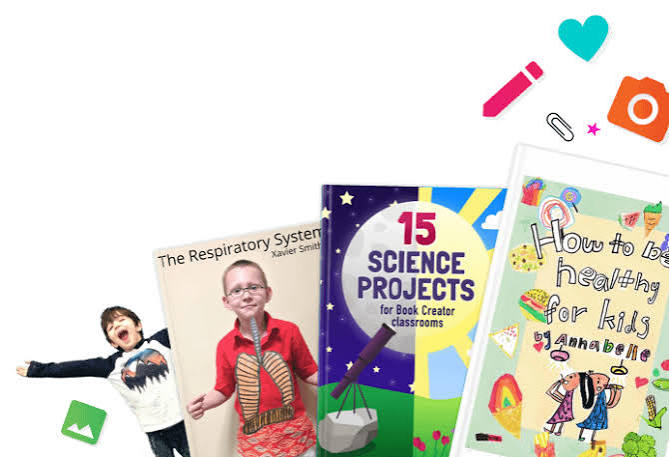
Book Creator offers several creative features that make digital publishing accessible to beginners and experienced users. Its editing workspace allows users to create individual pages, insert content, change layouts, and organize information into a complete book. These tools make it possible to produce different types of publications according to personal or educational requirements.
Text and image tools are among the basic features. Users can write paragraphs, add headings, insert photographs, and include illustrations to make pages visually interesting. They can also use drawing tools to create original artwork and personalize their books. These features are particularly useful for children who enjoy combining writing with creative activities.
Another important feature is multimedia integration. Users can add audio recordings and videos to support their written content. A language-learning book, for example, could include pronunciation recordings, while a science project could contain videos explaining an experiment. This combination of different media formats helps make digital books more interactive and gives creators additional ways to communicate information.
3. How to Create a Digital Book Using Book Creator
Creating a digital book with Book Creator begins by visiting its official website and accessing the available workspace. Depending on the current account and access options, users may need to register or sign in before starting a project. Once inside the platform, they can create a new book and select an appropriate layout or page format.
After opening a project, users can begin adding content to individual pages. They can write a title, introduce the topic, insert images, and organize information into suitable sections. The editing tools allow creators to move elements around and adjust the appearance of their pages. It is helpful to keep the design consistent so that the finished book looks organized and easy to read.
When the main content is complete, users can review the entire book and make necessary corrections. Checking spelling, grammar, image placement, and page order can improve the final result. Depending on the available sharing and publishing options, the completed book can then be shared with classmates, teachers, or other intended readers.
4. Book Creator for Teachers and Classrooms
Teachers can use Book Creator to introduce creative learning activities and encourage students to express their understanding of different subjects. Rather than completing every assignment through traditional written exercises, students can create digital books that combine explanations, illustrations, photographs, and recordings. This approach can make classroom activities more engaging and provide opportunities for different forms of expression.
For example, a teacher can ask students to create a digital book about the solar system. Students can write short descriptions of planets, add relevant pictures, and organize the information into separate pages. In an English lesson, learners might create their own short stories with illustrations and recorded narration. These projects allow teachers to assess both subject knowledge and communication skills.
Book Creator can also support classroom portfolios. Students can collect examples of their work throughout a school term and organize them into digital publications. A portfolio might include writing assignments, science projects, artwork, photographs, and personal reflections. Teachers can use these collections to review student progress and encourage learners to recognize their achievements over time.
5. Benefits of Book Creator for Students
One major benefit of Book Creator is that it encourages creativity. Students have the freedom to decide how their books should look and what types of content they want to include. They can experiment with layouts, illustrations, colors, and multimedia features while developing their own ideas. This creative freedom can make learning more enjoyable and encourage students to participate more actively in classroom activities.
The platform can also improve writing and communication skills. Creating a complete book requires students to organize information, develop paragraphs, choose suitable vocabulary, and present ideas in a logical order. When they review and edit their work, they also practise important language skills. Recording audio or adding narration provides additional opportunities to develop speaking and communication abilities.
Another advantage is the development of digital literacy. Students learn how to use digital tools to create, organize, and share information. These skills are increasingly important in modern education and professional environments. By working on digital publishing projects, learners can become more comfortable using technology for productive purposes rather than only for entertainment.
6. Book Creator for Parents and Homeschooling
Book Creator can also be useful for parents who want to encourage creative activities at home. Families can use it to help children create picture books, personal journals, family history projects, and simple educational publications. These activities provide an opportunity for children to practise writing while exploring their interests in a creative environment.
Homeschooling parents may use the platform to organize learning projects across different subjects. A child studying animals, for example, can create a digital book containing animal names, photographs, descriptions, and interesting facts. A mathematics project could include explanations of basic calculations, illustrated examples, and practice questions. These projects allow children to demonstrate what they have learned in a format that feels different from traditional homework.
Parents can also use Book Creator to encourage reading and storytelling. Younger children may create simple picture books with short sentences, while older learners can develop longer stories with multiple chapters. Parents can participate by discussing story ideas, helping with editing, and encouraging children to improve their work. This can turn digital book creation into a positive family learning activity.
7. Is Book Creator Free or Paid?
Book Creator provides different access options, including free and paid plans. The exact features and usage limits depend on the current subscription arrangements. Users can explore the platform’s free offering to understand how its tools work before deciding whether a paid option is necessary for their requirements.
The free option can be suitable for individuals who want to experiment with digital book creation or complete occasional projects. It provides an opportunity to understand the editing process and explore creative possibilities without immediately purchasing a subscription. However, users should check the current account limits and available features because free access may not include everything offered through paid plans.
Paid plans may be more appropriate for schools, teachers, or individuals who need additional publishing features and greater project capacity. Before choosing a subscription, it is important to review the official pricing information, available tools, storage conditions, and collaboration options. Selecting the right plan depends on how frequently the platform will be used and the number of books or projects that need to be created.
8. Book Creator vs Traditional Book Writing
Traditional book writing usually involves working with paper, notebooks, or conventional publishing software. Authors generally focus on written content and may need separate tools to design covers, insert images, and prepare the final publication. This method remains valuable, particularly for people who enjoy physical books and traditional writing processes.
Book Creator offers a different approach by combining writing and multimedia design in one digital environment. Users can create pages containing text, images, audio, and videos without needing several separate applications. This can be especially convenient for educational projects where students need to present information using more than written words.
However, both methods have their advantages. Traditional writing can help children develop handwriting and focus on written expression, while digital book creation introduces additional creative and technical opportunities. Teachers and parents can choose either method depending on the learning objectives, available devices, and preferences of individual students. Combining both approaches can provide a balanced educational experience.
9. Tips for Creating Better Books with Book Creator
Creating an attractive digital book requires more than adding text and images to pages. Good organization, clear writing, and consistent design all contribute to the overall quality of a publication. Before starting a project, it is helpful to decide what the book will be about, who will read it, and what information should be included.
The cover page is an important part of the design because it introduces the book to readers. A suitable title, relevant image, and simple layout can make the publication look professional. Inside the book, creators should organize information into logical sections and avoid overcrowding pages with too much text. Short paragraphs, meaningful headings, and relevant illustrations can make content easier to understand.
It is also important to review the finished publication before sharing it. Creators should check spelling, grammar, image quality, page order, and multimedia elements. Any pictures, recordings, or other materials included in a book should be appropriate and used with the necessary permissions. Taking time to review these details can improve the reading experience and make the final digital book more effective.
10. Why Book Creator Is Useful in Modern Education
Modern education increasingly encourages students to develop creativity, communication, collaboration, and technology skills alongside traditional academic knowledge. Book Creator supports these objectives by giving learners a practical way to create and present their own work. Instead of simply receiving information, students can become active participants in producing educational content.
The platform also provides flexibility for different subjects and age groups. Younger children can create simple picture books, while older students can prepare detailed research projects and educational guides. Teachers can adapt activities according to classroom needs and allow students to demonstrate their understanding through different types of digital content.
Another important reason Book Creator is useful is its potential to make student work easier to share and review. Digital publications can provide teachers with examples of student progress and give learners a chance to present their achievements. When used thoughtfully, the platform can support a more interactive classroom environment and encourage students to take greater responsibility for their learning.
Conclusion
Book Creator is a useful digital publishing platform that makes it easier for students, teachers, parents, and creative individuals to produce interactive books. Its combination of writing, images, drawings, audio, and video provides different ways to communicate ideas and present information.
For schools, the platform can support classroom assignments, digital portfolios, storytelling, and subject-based projects. Parents and homeschooling families can also use it to encourage reading, writing, and creative learning at home. Its accessible design makes digital publishing easier for people who do not have advanced technical or graphic design skills.
Overall, Book Creator offers an engaging way to combine education and creativity. By giving learners the opportunity to become authors of their own digital publications, it can help develop important academic, communication, and digital skills while making the learning experience more enjoyable.
